5 Best VidRush Alternatives for AI Avatar Videos in 2026
I compare the 5 best VidRush alternatives for AI avatar YouTube videos. TubeAvatar is cheaper, works in most languages, and needs no subscription.

VidRush built its name on faceless video automation. In September 2026, it added Persona I, an AI avatar model that turns a script into a long-form video with a presenter on screen. It's fast, it's built for volume, and it starts at $99 a month.
For a channel built around an AI presenter, that's a lot of money for a narrow tool. Persona I avatar videos are English only. You get two preset presenters or one made from your photo, a handful of voices, and no way to use your own. When the footage misses, your control over fixing it is limited.
TubeAvatar is the best VidRush alternative for AI avatar channels, and the cheapest. It's a free desktop app from TubeLab that turns a script into a finished long-form video with any presenter you want, in your own voice and most major languages. There's no subscription required, and you pay the AI providers directly with no markup, from about $0.20 a finished minute.
This guide compares the top 5 VidRush alternatives for AI avatar videos, with current pricing, real feature breakdowns, and honest recommendations.
TubeAvatar: Best overall and cheapest. Free app, no subscription, from $0.20 a minute, most languages, full control.
HeyGen: Avatar tool from $29 a month. The pictures, clips, and YouTube edit are on you.
Headcast: HeyGen avatars with no editing after submit, from $99 a month.
FaceTuber: AI characters with no editor, from $79 a month.
Subscribr: Research suite with a video add-on, from $99 a month.
VidRush is an AI video platform known for documentary-style and list videos made without a presenter. Persona I, launched in September 2026, adds an AI avatar that presents the whole video. You paste a script, pick or create a presenter, and VidRush generates the finished long-form video.
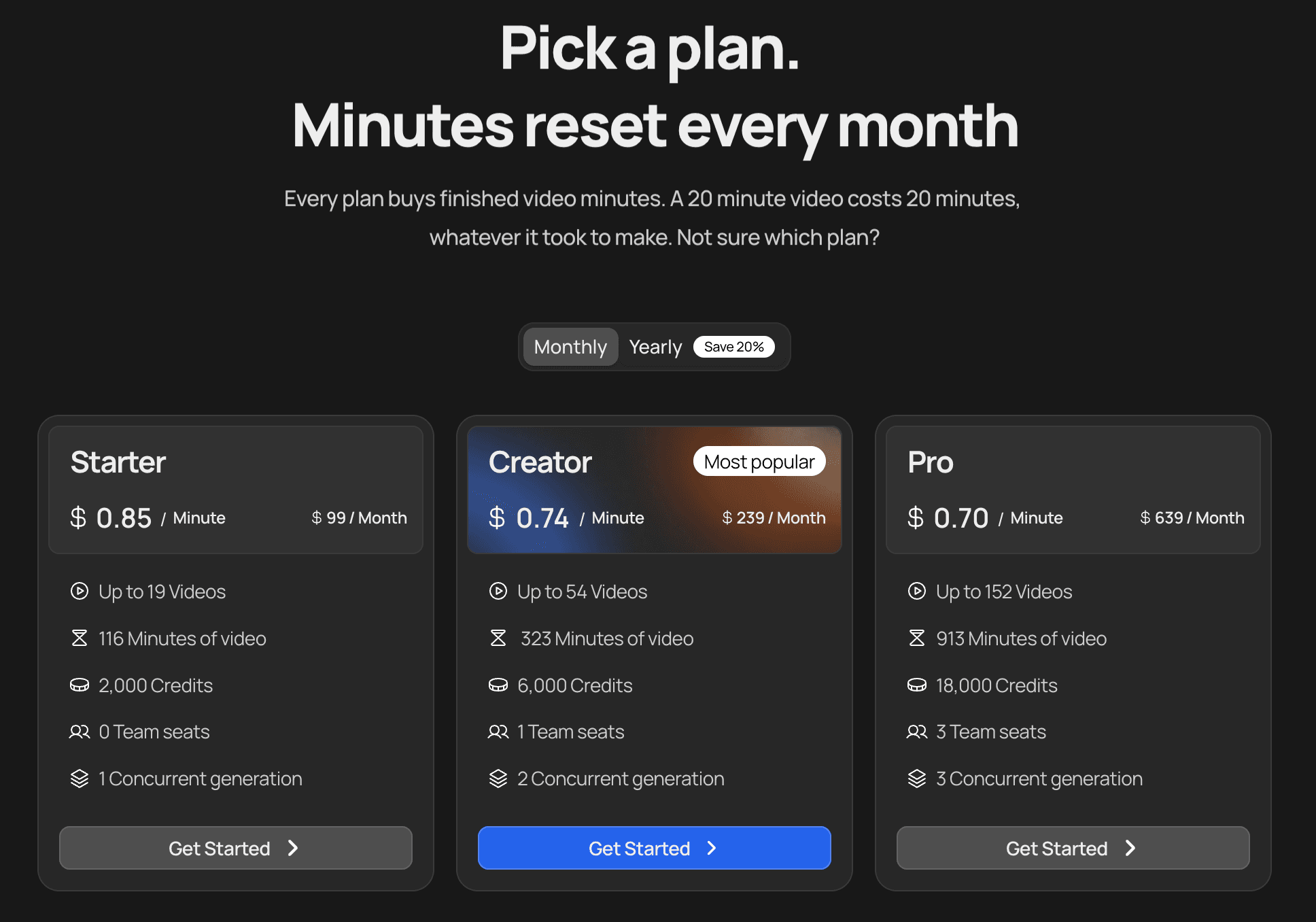
Plan | Monthly | Minutes per month | Per minute |
|---|---|---|---|
Starter | $99 | 116 | $0.85 |
Creator | $239 | 323 | $0.74 |
Pro | $639 | 913 | $0.70 |
Scale | $1,750 | 2,692 | $0.65 |
Yearly billing saves 20%. VidRush advertises rates from $0.53 a minute, but those are on enterprise plans available on request.
TubeAvatar is a desktop app from TubeLab that turns a script into a finished long-form YouTube video with an AI presenter, matched pictures and clips, subtitles, and product cards. It fixes the biggest Persona I limitations, and it costs less.
Set up a presenter once. Use a photo of yourself, or describe any character you want. Clone your voice from a short recording, pick another voice, or upload a voiceover you recorded.
Paste a script and set a budget. The budget is a ceiling, and the editor works to stay under it.
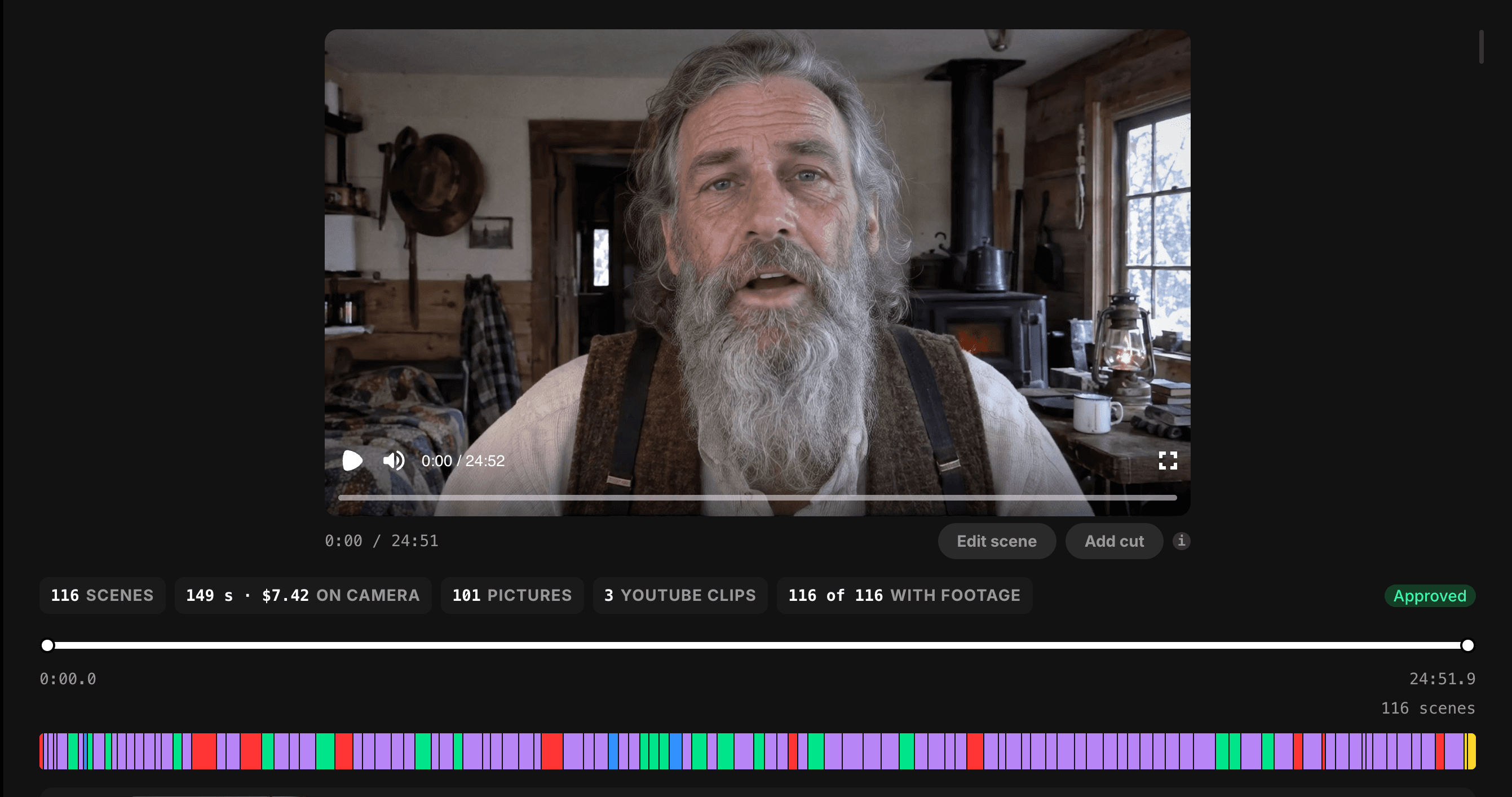
Review the storyboard. Every scene shows whether it uses the presenter, a picture, or a clip. Swap or fix anything before the presenter clips are made.
Render. You get a finished video of any length, at 720p or 1080p, with a subtitle file.
Persona I gives you two presets and English. TubeAvatar gives you whoever you want, speaking however you want.
VidRush users most often complain about footage that doesn't match the script. TubeAvatar is built around catching that before it costs you.
The storyboard shows every scene before the presenter clips, the expensive step, are generated. You can swap a picture, change a clip, or ask the editor to rework a section. Your own photos and clips are used before anything found online. Nothing renders until you approve it.
Prefer it hands-off? Turn on skip review and auto render, and TubeAvatar goes from script to finished file without stopping.
TubeAvatar's demo, a 12:48 video, cost $3.50 in total.
For a channel making four 10-minute videos a month, TubeAvatar costs about $20:
Over a year of weekly videos, that's about $260 on TubeAvatar against roughly $950 on VidRush, even with VidRush's yearly discount.
TubeAvatar is built for educational videos with a presenter teaching to camera: explainers, how-tos, guides, and lessons. That's the format most likely to stay monetized under YouTube's rules on mass-produced content.
Add your product once. When your script mentions it, a card with its picture, link, and QR code appears on screen at that moment. VidRush Persona I has no product cards.
Multilingual avatar channels. Run the same format in Spanish, German, Portuguese, or Hindi, where competition is often far lower than in English.
Creator-led channels. Put an avatar of yourself on screen, speaking in your own cloned voice, without filming.
Educational channels. Explainers, how-tos, history, and practical guides with a consistent host and visuals matched to every line.
Product sellers. Channels built around a book, course, or physical product, with product cards that appear whenever the script mentions it.
Multi-channel operators. Set up a different presenter for each channel and switch between them per video.
Feature | TubeAvatar | VidRush Persona I |
|---|---|---|
Cheapest way to start | Free app + about $10 AI credit | $99/month |
Cost per finished minute | $0.20 to about $0.50 | $0.65 to $0.85 |
Subscription required | ❌ No | ✅ Yes |
AI costs | Paid direct, no markup | Bundled into price |
Presenter options | Your face or any described character | 2 presets or 1 from your photo |
Your own voice | ✅ Clone or upload | ❌ |
Languages for avatar videos | Most major languages | English only |
Change the presenter later | ✅ | ❌ Start over |
Review every scene before the avatar renders | ✅ Storyboard | ⚠️ AI agent after generation |
Product cards with QR code | ✅ | ❌ |
Max video length | No limit | Not stated |
Files stay on your computer | ✅ | ❌ |
Videos per month (10 min each) | TubeAvatar | VidRush Persona I |
|---|---|---|
4 | about $20 | $99 |
12 | about $60 | $239 |
30 | about $179 | $239 |
TubeAvatar's figures assume about $0.50 a minute, on the free plan up to 3 videos a week and on Starter for daily videos. Connect your own AI plans and they drop further. Over a year of weekly videos, TubeAvatar comes to about $260 in AI costs. VidRush's Starter plan costs about $950 a year even with yearly billing.
Those savings let you make longer videos without worrying about the bill, and long videos help new channels reach YouTube's 8,000 watch hours requirement faster.
TubeAvatar is the best and cheapest VidRush alternative for AI avatar channels. A few other tools make avatar videos too, each with trade-offs.
Price: From $29/month
Cost per minute: about $0.97 for its Avatar IV model, avatar only
Free plan: 3 videos a month, 1 minute each
HeyGen is a widely used AI avatar platform, built mainly for training, marketing, and translation videos.
However: The $29 Creator plan covers roughly 30 minutes of Avatar IV a month, about three 10-minute videos. You get the talking head, but the pictures, clips, and YouTube-style edit come on top, and re-renders cost full price. TubeAvatar can use your HeyGen plan for the presenter and handle the rest of the video itself.
Price: From $99/month
Cost per minute: $0.66 to $0.87
Free trial: A few test minutes
Headcast turns a script, a photo, and a voice sample into a talking-head YouTube video using HeyGen's avatar model.
However: The same $99 entry price as VidRush. Videos can't be edited once submitted, there's no storyboard, and plan minutes don't roll over.
Price: From $79/month
Cost per minute: $1.00 to $1.55
Free trial: None listed
FaceTuber builds AI characters for faceless channels and turns scripts into videos with a talking head and b-roll.
However: It costs more per minute than VidRush, at $1.55 on the entry plan. There's no editor or timeline, credits don't roll over, and it's still in early access.
Price: From $99/month
Cost per minute: $1.00 to $1.50
Free plan: Research only, no video
Subscribr is a YouTube research and scripting platform that added video generation, faceless or with an AI avatar.
However: Video costs $1.50 a minute on the entry plan, nearly double VidRush and three times TubeAvatar's typical rate. Credits don't roll over, and all purchases are final.
Feature | TubeAvatar | VidRush | Persona I HeyGen | Headcast | FaceTuber | Subscribr |
|---|---|---|---|---|---|---|
Cheapest way to start | Free + about $10 AI credit | $99/month | $29/month | $99/month | $79/month | $99/month |
Subscription required | ❌ No | ✅ Yes | ✅ Yes | ✅ Yes | ✅ Yes | ✅ Yes |
Cost per minute | $0.20 to about $0.50 | $0.65 to $0.85 | about $0.97, avatar only | $0.66 to $0.87 | $1.00 to $1.55 | $1.00 to $1.50 |
Your own voice | ✅ | ❌ | ✅ | ✅ | ⚠️ Not stated | ✅ |
Languages | Most major | English only | 175+ | One per presenter | Not stated | Multiple |
Edit scenes before final render | ✅ Storyboard | ⚠️ After generation | ✅ Editor | ❌ | ❌ | ⚠️ Limited |
Product cards | ✅ | ❌ | ❌ | ✅ | ✅ | ❌ |
Files on your computer | ✅ | ❌ | ❌ | ❌ | ❌ | ❌ |
Best for | AI avatar channels on any budget | English volume | Short business videos | Hands-off talking heads | Many faceless channels | Research-first creators |
Choose TubeAvatar. It's the cheapest option at every volume, needs no subscription, and gives you more presenters, voices, languages, and control than VidRush.
Choose TubeAvatar. VidRush Persona I only makes avatar videos in English. TubeAvatar works in most major languages, which also opens up markets with far less competition.
Choose TubeAvatar. Clone your voice from a short recording or upload a voiceover you recorded. VidRush avatars can only use their built-in voices.
Choose TubeAvatar with skip review and auto render turned on, and it runs from script to finished file on its own. VidRush and Headcast offer similar automation for $99 a month or more.
If you're building a channel around AI avatar videos, TubeAvatar is the best VidRush alternative and the cheapest. It costs less at every volume, needs no subscription, and removes VidRush's biggest limits: English only, preset presenters, no voice of your own, and limited control over the edit.
What is the best VidRush alternative?
For AI avatar videos, TubeAvatar is the best VidRush alternative. It makes finished long-form videos with any presenter, in your own voice and most major languages, from about $0.20 a minute with no subscription required. VidRush Persona I starts at $99 a month and only makes avatar videos in English.
Is there a cheaper alternative to VidRush?
Yes. TubeAvatar is free to download, and a free account makes 3 videos a week. You pay AI providers directly, from about $0.20 a minute with your own AI plans, or around $0.50 without them. Four 10-minute videos a month cost about $20, against $99 on VidRush.
How much does VidRush Persona I cost?
Persona I plans range from $99 a month for 116 minutes ($0.85 a minute) to $1,750 a month for 2,692 minutes ($0.65 a minute). Yearly billing saves 20%. Rates from $0.53 a minute are available on enterprise plans by request.
Can I use my own voice in VidRush avatar videos?
No. VidRush avatars come with two or three built-in voices each, and custom voiceovers can't be combined with an avatar. TubeAvatar lets you clone your voice from a short recording or upload a full voiceover.
Does VidRush Persona I work in other languages?
Not for avatar videos. VidRush accepts prompts in a few languages, but avatar videos are English only. TubeAvatar supports most major languages for both the script and the voice.
Can I edit a VidRush avatar video?
Partly. VidRush has an AI editing agent that can regenerate sections and swap footage after generation, but the avatar itself can't be changed. TubeAvatar shows a storyboard before the presenter clips are made, so you can fix scenes before you pay for the expensive part.
Is TubeAvatar good for faceless channels?
Yes, if you want a host on screen. Your presenter can be a character you create, so the channel gets a face without ever showing yours. A consistent presenter also gives a faceless channel an identity, which templated slideshows don't have.
Is VidRush worth it for AI avatar videos?
For English-only videos with a preset presenter, it works. For most AI avatar channels, it's hard to justify. It costs $99 a month to start, you can't use your own voice, and you can't make avatar videos in other languages. TubeAvatar does all of that from about $0.20 a minute with no subscription.
Can AI avatar videos be monetized on YouTube?
Yes. YouTube allows AI presenters and refuses to pay for mass-produced, repetitive, or low-effort content. Researched educational videos with a consistent presenter are the safest format. Disclose realistic AI when YouTube asks.
All prices checked in October 2026. Prices change often, so confirm on each tool's site before you buy.
VidRush Persona I is fast and built for volume, but it asks for $99 a month and gives you English only, two preset presenters, and no voice of your own.
TubeAvatar removes every one of those limits and costs less at every volume. The app is free, there's no subscription required, and you pay the AI providers directly with no markup. You choose the presenter, the voice, and the language, and you approve every scene before the expensive part runs.
If your channel is built around an AI presenter, there's no reason to pay more for less.
Pro includes the Niche Finder and Outliers Finder with every filter, Trending Formats, the Monetization Tracker, weekly Niche and Trend Reports, the Scriptwriter, unlimited TubeAvatar videos, and API and MCP access. Plans start at $29/month, and yearly billing gets you 3 months free. Cancel anytime.
VidRush built its name on faceless video automation. In September 2026, it added Persona I, an AI avatar model that turns a script into a long-form video with a presenter on screen. It's fast, it's built for volume, and it starts at $99 a month.
For a channel built around an AI presenter, that's a lot of money for a narrow tool. Persona I avatar videos are English only. You get two preset presenters or one made from your photo, a handful of voices, and no way to use your own. When the footage misses, your control over fixing it is limited.
TubeAvatar is the best VidRush alternative for AI avatar channels, and the cheapest. It's a free desktop app from TubeLab that turns a script into a finished long-form video with any presenter you want, in your own voice and most major languages. There's no subscription required, and you pay the AI providers directly with no markup, from about $0.20 a finished minute.
This guide compares the top 5 VidRush alternatives for AI avatar videos, with current pricing, real feature breakdowns, and honest recommendations.
TubeAvatar: Best overall and cheapest. Free app, no subscription, from $0.20 a minute, most languages, full control.
HeyGen: Avatar tool from $29 a month. The pictures, clips, and YouTube edit are on you.
Headcast: HeyGen avatars with no editing after submit, from $99 a month.
FaceTuber: AI characters with no editor, from $79 a month.
Subscribr: Research suite with a video add-on, from $99 a month.
VidRush is an AI video platform known for documentary-style and list videos made without a presenter. Persona I, launched in September 2026, adds an AI avatar that presents the whole video. You paste a script, pick or create a presenter, and VidRush generates the finished long-form video.
Plan | Monthly | Minutes per month | Per minute |
|---|---|---|---|
Starter | $99 | 116 | $0.85 |
Creator | $239 | 323 | $0.74 |
Pro | $639 | 913 | $0.70 |
Scale | $1,750 | 2,692 | $0.65 |
Yearly billing saves 20%. VidRush advertises rates from $0.53 a minute, but those are on enterprise plans available on request.
TubeAvatar is a desktop app from TubeLab that turns a script into a finished long-form YouTube video with an AI presenter, matched pictures and clips, subtitles, and product cards. It fixes the biggest Persona I limitations, and it costs less.
Set up a presenter once. Use a photo of yourself, or describe any character you want. Clone your voice from a short recording, pick another voice, or upload a voiceover you recorded.
Paste a script and set a budget. The budget is a ceiling, and the editor works to stay under it.
Review the storyboard. Every scene shows whether it uses the presenter, a picture, or a clip. Swap or fix anything before the presenter clips are made.
Render. You get a finished video of any length, at 720p or 1080p, with a subtitle file.
Persona I gives you two presets and English. TubeAvatar gives you whoever you want, speaking however you want.
VidRush users most often complain about footage that doesn't match the script. TubeAvatar is built around catching that before it costs you.
The storyboard shows every scene before the presenter clips, the expensive step, are generated. You can swap a picture, change a clip, or ask the editor to rework a section. Your own photos and clips are used before anything found online. Nothing renders until you approve it.
Prefer it hands-off? Turn on skip review and auto render, and TubeAvatar goes from script to finished file without stopping.
TubeAvatar's demo, a 12:48 video, cost $3.50 in total.
For a channel making four 10-minute videos a month, TubeAvatar costs about $20:
Over a year of weekly videos, that's about $260 on TubeAvatar against roughly $950 on VidRush, even with VidRush's yearly discount.
TubeAvatar is built for educational videos with a presenter teaching to camera: explainers, how-tos, guides, and lessons. That's the format most likely to stay monetized under YouTube's rules on mass-produced content.
Add your product once. When your script mentions it, a card with its picture, link, and QR code appears on screen at that moment. VidRush Persona I has no product cards.
Multilingual avatar channels. Run the same format in Spanish, German, Portuguese, or Hindi, where competition is often far lower than in English.
Creator-led channels. Put an avatar of yourself on screen, speaking in your own cloned voice, without filming.
Educational channels. Explainers, how-tos, history, and practical guides with a consistent host and visuals matched to every line.
Product sellers. Channels built around a book, course, or physical product, with product cards that appear whenever the script mentions it.
Multi-channel operators. Set up a different presenter for each channel and switch between them per video.
Feature | TubeAvatar | VidRush Persona I |
|---|---|---|
Cheapest way to start | Free app + about $10 AI credit | $99/month |
Cost per finished minute | $0.20 to about $0.50 | $0.65 to $0.85 |
Subscription required | ❌ No | ✅ Yes |
AI costs | Paid direct, no markup | Bundled into price |
Presenter options | Your face or any described character | 2 presets or 1 from your photo |
Your own voice | ✅ Clone or upload | ❌ |
Languages for avatar videos | Most major languages | English only |
Change the presenter later | ✅ | ❌ Start over |
Review every scene before the avatar renders | ✅ Storyboard | ⚠️ AI agent after generation |
Product cards with QR code | ✅ | ❌ |
Max video length | No limit | Not stated |
Files stay on your computer | ✅ | ❌ |
Videos per month (10 min each) | TubeAvatar | VidRush Persona I |
|---|---|---|
4 | about $20 | $99 |
12 | about $60 | $239 |
30 | about $179 | $239 |
TubeAvatar's figures assume about $0.50 a minute, on the free plan up to 3 videos a week and on Starter for daily videos. Connect your own AI plans and they drop further. Over a year of weekly videos, TubeAvatar comes to about $260 in AI costs. VidRush's Starter plan costs about $950 a year even with yearly billing.
Those savings let you make longer videos without worrying about the bill, and long videos help new channels reach YouTube's 8,000 watch hours requirement faster.
TubeAvatar is the best and cheapest VidRush alternative for AI avatar channels. A few other tools make avatar videos too, each with trade-offs.
Price: From $29/month
Cost per minute: about $0.97 for its Avatar IV model, avatar only
Free plan: 3 videos a month, 1 minute each
HeyGen is a widely used AI avatar platform, built mainly for training, marketing, and translation videos.
However: The $29 Creator plan covers roughly 30 minutes of Avatar IV a month, about three 10-minute videos. You get the talking head, but the pictures, clips, and YouTube-style edit come on top, and re-renders cost full price. TubeAvatar can use your HeyGen plan for the presenter and handle the rest of the video itself.
Price: From $99/month
Cost per minute: $0.66 to $0.87
Free trial: A few test minutes
Headcast turns a script, a photo, and a voice sample into a talking-head YouTube video using HeyGen's avatar model.
However: The same $99 entry price as VidRush. Videos can't be edited once submitted, there's no storyboard, and plan minutes don't roll over.
Price: From $79/month
Cost per minute: $1.00 to $1.55
Free trial: None listed
FaceTuber builds AI characters for faceless channels and turns scripts into videos with a talking head and b-roll.
However: It costs more per minute than VidRush, at $1.55 on the entry plan. There's no editor or timeline, credits don't roll over, and it's still in early access.
Price: From $99/month
Cost per minute: $1.00 to $1.50
Free plan: Research only, no video
Subscribr is a YouTube research and scripting platform that added video generation, faceless or with an AI avatar.
However: Video costs $1.50 a minute on the entry plan, nearly double VidRush and three times TubeAvatar's typical rate. Credits don't roll over, and all purchases are final.
Feature | TubeAvatar | VidRush | Persona I HeyGen | Headcast | FaceTuber | Subscribr |
|---|---|---|---|---|---|---|
Cheapest way to start | Free + about $10 AI credit | $99/month | $29/month | $99/month | $79/month | $99/month |
Subscription required | ❌ No | ✅ Yes | ✅ Yes | ✅ Yes | ✅ Yes | ✅ Yes |
Cost per minute | $0.20 to about $0.50 | $0.65 to $0.85 | about $0.97, avatar only | $0.66 to $0.87 | $1.00 to $1.55 | $1.00 to $1.50 |
Your own voice | ✅ | ❌ | ✅ | ✅ | ⚠️ Not stated | ✅ |
Languages | Most major | English only | 175+ | One per presenter | Not stated | Multiple |
Edit scenes before final render | ✅ Storyboard | ⚠️ After generation | ✅ Editor | ❌ | ❌ | ⚠️ Limited |
Product cards | ✅ | ❌ | ❌ | ✅ | ✅ | ❌ |
Files on your computer | ✅ | ❌ | ❌ | ❌ | ❌ | ❌ |
Best for | AI avatar channels on any budget | English volume | Short business videos | Hands-off talking heads | Many faceless channels | Research-first creators |
Choose TubeAvatar. It's the cheapest option at every volume, needs no subscription, and gives you more presenters, voices, languages, and control than VidRush.
Choose TubeAvatar. VidRush Persona I only makes avatar videos in English. TubeAvatar works in most major languages, which also opens up markets with far less competition.
Choose TubeAvatar. Clone your voice from a short recording or upload a voiceover you recorded. VidRush avatars can only use their built-in voices.
Choose TubeAvatar with skip review and auto render turned on, and it runs from script to finished file on its own. VidRush and Headcast offer similar automation for $99 a month or more.
If you're building a channel around AI avatar videos, TubeAvatar is the best VidRush alternative and the cheapest. It costs less at every volume, needs no subscription, and removes VidRush's biggest limits: English only, preset presenters, no voice of your own, and limited control over the edit.
What is the best VidRush alternative?
For AI avatar videos, TubeAvatar is the best VidRush alternative. It makes finished long-form videos with any presenter, in your own voice and most major languages, from about $0.20 a minute with no subscription required. VidRush Persona I starts at $99 a month and only makes avatar videos in English.
Is there a cheaper alternative to VidRush?
Yes. TubeAvatar is free to download, and a free account makes 3 videos a week. You pay AI providers directly, from about $0.20 a minute with your own AI plans, or around $0.50 without them. Four 10-minute videos a month cost about $20, against $99 on VidRush.
How much does VidRush Persona I cost?
Persona I plans range from $99 a month for 116 minutes ($0.85 a minute) to $1,750 a month for 2,692 minutes ($0.65 a minute). Yearly billing saves 20%. Rates from $0.53 a minute are available on enterprise plans by request.
Can I use my own voice in VidRush avatar videos?
No. VidRush avatars come with two or three built-in voices each, and custom voiceovers can't be combined with an avatar. TubeAvatar lets you clone your voice from a short recording or upload a full voiceover.
Does VidRush Persona I work in other languages?
Not for avatar videos. VidRush accepts prompts in a few languages, but avatar videos are English only. TubeAvatar supports most major languages for both the script and the voice.
Can I edit a VidRush avatar video?
Partly. VidRush has an AI editing agent that can regenerate sections and swap footage after generation, but the avatar itself can't be changed. TubeAvatar shows a storyboard before the presenter clips are made, so you can fix scenes before you pay for the expensive part.
Is TubeAvatar good for faceless channels?
Yes, if you want a host on screen. Your presenter can be a character you create, so the channel gets a face without ever showing yours. A consistent presenter also gives a faceless channel an identity, which templated slideshows don't have.
Is VidRush worth it for AI avatar videos?
For English-only videos with a preset presenter, it works. For most AI avatar channels, it's hard to justify. It costs $99 a month to start, you can't use your own voice, and you can't make avatar videos in other languages. TubeAvatar does all of that from about $0.20 a minute with no subscription.
Can AI avatar videos be monetized on YouTube?
Yes. YouTube allows AI presenters and refuses to pay for mass-produced, repetitive, or low-effort content. Researched educational videos with a consistent presenter are the safest format. Disclose realistic AI when YouTube asks.
All prices checked in October 2026. Prices change often, so confirm on each tool's site before you buy.
VidRush Persona I is fast and built for volume, but it asks for $99 a month and gives you English only, two preset presenters, and no voice of your own.
TubeAvatar removes every one of those limits and costs less at every volume. The app is free, there's no subscription required, and you pay the AI providers directly with no markup. You choose the presenter, the voice, and the language, and you approve every scene before the expensive part runs.
If your channel is built around an AI presenter, there's no reason to pay more for less.
Pro includes the Niche Finder and Outliers Finder with every filter, Trending Formats, the Monetization Tracker, weekly Niche and Trend Reports, the Scriptwriter, unlimited TubeAvatar videos, and API and MCP access. Plans start at $29/month, and yearly billing gets you 3 months free. Cancel anytime.