5 Best HeyGen Alternatives for YouTube in 2026
I compare the 5 best HeyGen alternatives for long-form YouTube videos

HeyGen made AI avatars mainstream. Type a script, pick a face, and a presenter reads it back. For training videos and sales clips, that's often all you need.
YouTube is a different job. A long-form video needs a presenter, but it also needs pictures, clips, captions, and an edit that holds attention for ten or twenty minutes. On HeyGen, every minute of its best avatar burns credits, and re-renders cost the full amount again.
TubeAvatar is the best HeyGen alternative for YouTube. It turns a script into a finished long-form video with an AI presenter, cut together with matching pictures and clips. The app is free, there's no subscription required, and you pay the AI providers directly with no markup. A finished minute can cost as little as $0.20.
This guide compares the top 5 HeyGen alternatives for YouTube, with current pricing, real feature breakdowns, and honest recommendations so you can pick the right one for your channel.
TubeAvatar: Best overall. Free app, no subscription, from $0.20 a minute, and full control over every scene.
Headcast: HeyGen avatars with no editing, from $99 a month.
VidRush Persona I: English-only avatars, from $99 a month.
FaceTuber: AI characters with no editor, from $79 a month.
Subscribr: Research suite with video add-on, from $99 a month.
HeyGen is an AI video platform that turns text into videos presented by AI avatars. It's widely used for training, marketing, sales outreach, and translation, and it supports more than 175 languages on paid plans.
On Trustpilot, HeyGen scores 4.1 out of 5 from over 4,400 reviews. Ease of use gets the most praise. The most common complaint is that credits burn faster than expected.
TubeAvatar is a desktop app from TubeLab that turns a script into a finished long-form YouTube video with an AI presenter. HeyGen gives you a talking head. TubeAvatar gives you the whole video.
Set up a presenter once. Use a photo of yourself, or describe a brand-new character. Clone your voice from a short recording, or pick another voice.
Add a product, if you sell one. Photos, videos, and a link, set up once and reused.
Paste a script and set a budget. The budget is a ceiling, and the editor works to stay under it.
Review the storyboard. Every scene shows whether it uses the presenter, a picture, or a clip. Fix or swap anything you don't like.
Render and upload. You get a finished video file up to 30 minutes long, at 720p or 1080p, with a subtitle file.
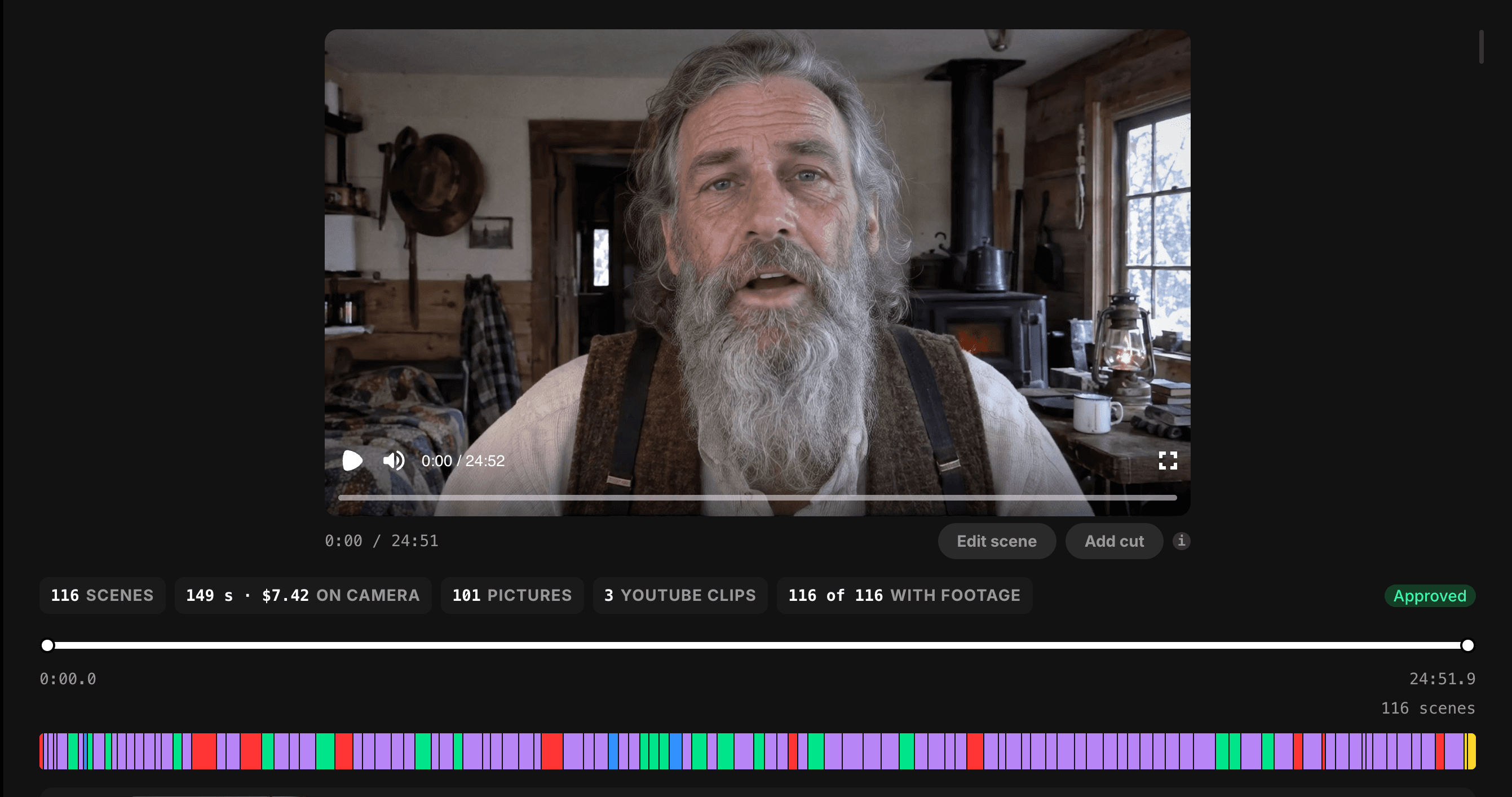 TubeAvatar Storyboard
Every other tool here needs a paid plan before you can make a full-length video. TubeAvatar doesn't.
The cheapest subscription among the alternatives below is $79 a month. Starting with TubeAvatar costs about $10, once.
TubeAvatar can use AI plans you already pay for. Connect your Claude or ChatGPT plan to handle the writing and editing, and your HeyGen plan to put the presenter on camera, and a finished minute can cost as little as $0.20.
Without those plans, the default budget is $1 a minute, and videos longer than 8 minutes usually come to around $0.50 a minute. TubeAvatar's own demo, a 12:48 cooking video, cost $3.50 in total.
You see every cent as it's spent, with a full log of each step and each AI call.
Most tools on this list decide the edit for you. TubeAvatar puts those decisions in your hands.
TubeAvatar is deliberate about the kind of video it makes. It's built for educational content with a presenter teaching to camera: explainers, how-tos, guides, and lessons, cut with pictures and clips that show what's being said.
That focus matters. YouTube's monetization rules target mass-produced, templated content, not AI itself. Researched, varied, educational videos are the format most likely to stay monetized.
Add your product once. When your script mentions it, a card with its picture, link, and QR code appears on screen at that moment. TubeAvatar finds the plug you wrote and never adds words to your script.
For channels that sell a guide, course, or physical product, this turns every video into a sales channel without any manual editing.
Plan | Price | TubeAvatar videos |
|---|---|---|
Free | $0 | 3 per week |
Starter | $29/month | 7 per week |
Pro | $39/month (normally $49) | Unlimited |
On top of the plan, you pay your own AI providers for what each video uses, from about $0.20 a minute.
Paid plans also include TubeLab's research tools. Pro adds the Scriptwriter, which researches your topic and writes in your voice, plus the Niche Finder with every filter, outlier discovery, and the Monetization Tracker.
Requirements: A Mac with Apple silicon or a Windows 10+ PC, a free TubeLab account, an OpenRouter key for the AI models, and a free Cloudflare R2 storage bucket. The app walks you through each one. Intel Macs and Linux aren't supported yet.
Educational channels. Explainers, how-tos, history, science, and practical guides, presented by a consistent host. TubeLab's Niche Finder shows which ones are earning for new channels.
Creators who don't want to film. Put your own face and voice on screen without a camera, lights, or retakes.
Product sellers. Channels built around a book, course, or physical product, with built-in product cards. Selling your own product is one of the biggest income streams on YouTube.
Long-form for watch hours. Videos with no length limit help channels build toward YouTube's 8,000 watch hours requirement faster than Shorts.
Multilingual channels. Scripts and voices in most major languages.
TubeAvatar is the best value for most YouTube creators. A few other tools make long-form avatar videos for YouTube, each with trade-offs worth knowing before you subscribe.
Price: From $99/month
Cost per minute: $0.66 to $0.87
Free trial: No free trial
Headcast turns a script, a photo, and a voice sample into a talking-head YouTube video. The presenter is rendered with HeyGen's Avatar IV, so you're paying a middleman for the same avatar model you could connect to TubeAvatar yourself.
However: Costs $99 a month before your first video. Videos can't be edited once submitted, and there's no storyboard to review. Plan minutes reset every month and don't roll over. A 10-minute video takes about 40 minutes to render.
Price: From $99/month
Cost per minute: $0.65 to $0.85
Free trial: None listed
VidRush is a faceless video automation tool that added an avatar model, Persona I, in September 2026. You paste a script, pick a presenter, and it generates the video.
However: Costs $99 a month to start. Avatar videos are English only. There are only two preset avatars plus one made from your photo, and you can't use your own voice. The avatar is a narrator only, and topics like finance, health, and news can be blocked. On Trustpilot, the most common complaint is repetitive or irrelevant footage.
Price: From $79/month
Cost per minute: $1.00 to $1.55
Free trial: None listed
FaceTuber builds AI characters for faceless channels and turns scripts into videos with a talking head and b-roll.
However: The most expensive tool on this list, at $1.55 a minute on the entry plan, three times TubeAvatar's typical rate. There's no editor or timeline, so you can't fix a single scene. Credits don't roll over. It's still in early access.
Price: From $99/month
Cost per minute: $1.00 to $1.50
Free plan: Research only, no video
Subscribr is a YouTube research and scripting platform that added video generation, with faceless styles or an AI avatar.
However: Video costs $1.50 a minute on the entry plan, three times TubeAvatar's typical rate, and the free plan can't make videos at all. Plan credits don't roll over, and all purchases are final with no refunds. Its reviews focus on scripting, not video.
Feature | TubeAvatar | HeyGen | Headcast | VidRush Persona I | FaceTuber | Subscribr |
|---|---|---|---|---|---|---|
Cheapest way to start | Free + about $10 API credit | $29/month | $99/month | $99/month | $79/month | $99/month |
Subscription required | ❌ No | ✅ Yes | ✅ Yes | ✅ Yes | ✅ Yes | ✅ Yes |
Cost per minute | $0.20 to about $0.50 | about $0.97 (Avatar IV) | $0.66 to $0.87 | $0.65 to $0.85 | $1.00 to $1.55 | $1.00 to $1.50 |
AI costs | Paid direct, no markup | Bundled into price | Bundled into price | Bundled into price | Bundled into price | Bundled into price |
Your own face | ✅ | ✅ | ✅ | ✅ | ⚠️ AI-built characters | ✅ |
New AI characters | ✅ | ✅ | ⚠️ Photo needed | ⚠️ 2 presets | ✅ | ✅ |
Your own voice | ✅ | ✅ | ✅ | ❌ | ⚠️ Not stated | ✅ |
Pictures and clips matched to script | ✅ | ⚠️ Via Video Agent | ✅ | ✅ | ✅ | ✅ |
Edit scenes before final render | ✅ Storyboard | ✅ Editor | ❌ | ✅ AI agent | ❌ | ⚠️ Limited |
Product cards with QR code | ✅ | ❌ | ✅ | ❌ | ✅ | ❌ |
Max video length | no length limit | 30 min (60 on Business) | about 30 min | Not stated | Not stated | Not stated |
Unused credits roll over | No credits to waste | ⚠️ 1 month | ❌ | ✅ Up to 1.5x | ❌ | ❌ |
Files stay on your computer | ✅ | ❌ | ❌ | ❌ | ❌ | ❌ |
Best for | Lowest cost, full control | Business and training video | Simple talking-head pipeline | High volume in English | Many faceless channels | All-in-one research + video |
Per-minute prices hide two things: what one video really costs, and what you pay before you make anything.
Here's both, on each tool's cheapest paid option.
Tool | Cost of one 10-minute video | Minimum to start About |
|---|---|---|
TubeAvatar | About $5 (as low as $2 if you already pay for Claude or ChatGPT and HeyGen) | $10 in API credit, no subscription |
VidRush Persona I | $8.50 | $99/month |
Headcast | $8.70 | $99/month |
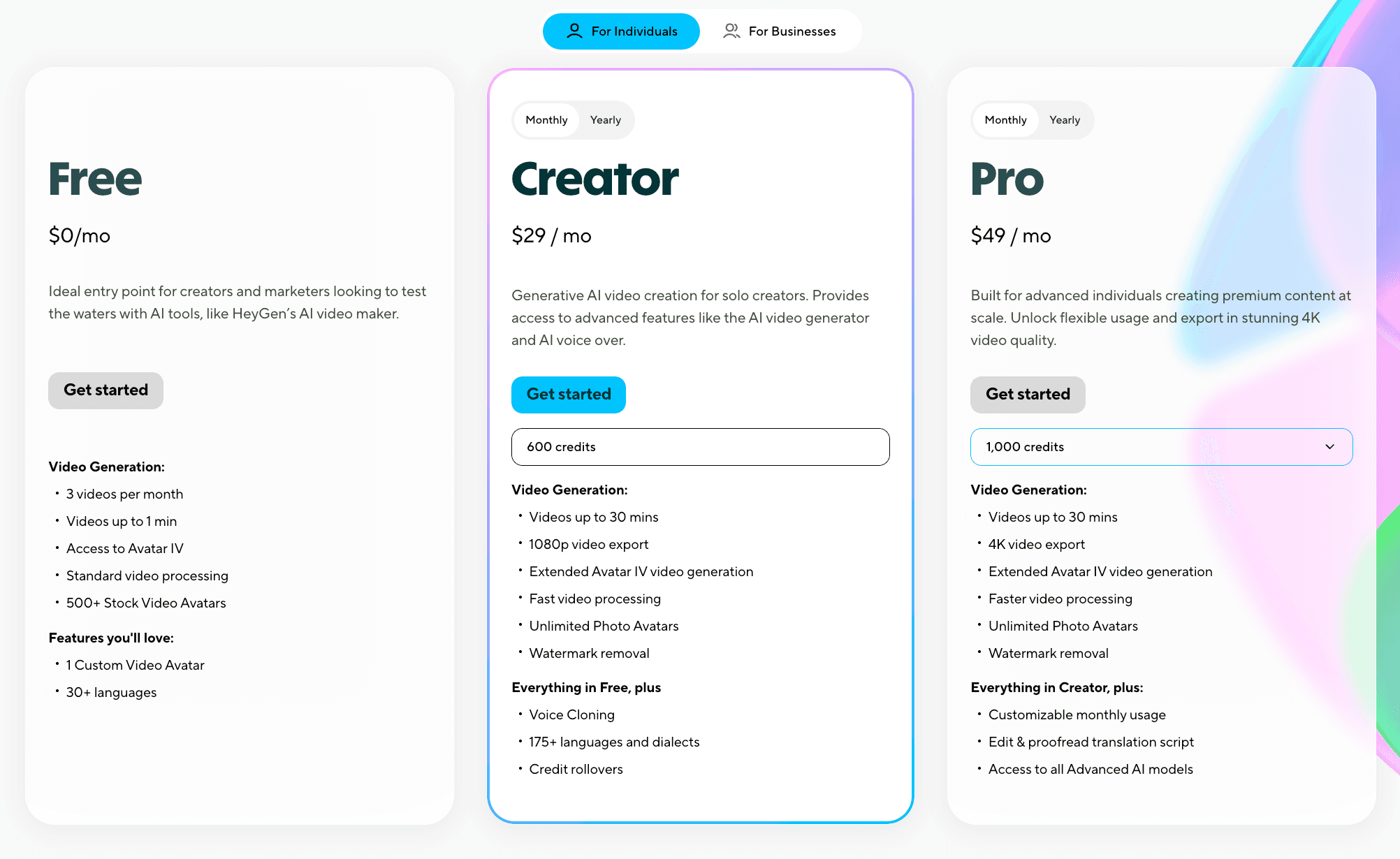
HeyGen | About $9.70 in Avatar IV credits | $29/month |
FaceTuber | $15.50 | $79/month |
Subscribr | $15.00 | $99/month |
HeyGen's figure covers only the avatar. The pictures, clips, and editing that turn it into a YouTube video come on top.
Over a year of weekly 10-minute videos, the difference adds up. TubeAvatar comes to roughly $260 in AI costs on the free plan. The subscription tools cost close to $950 a year or more before you've made anything. HeyGen is cheaper to join, but its Creator plan only covers about three avatar videos a month.
Choose TubeAvatar if you want the cheapest way to make long-form YouTube videos with an AI presenter, no subscription, no markup on AI costs, and the ability to edit every scene before you render.
Choose Headcast if you want to submit a script and never touch the edit. Be prepared to pay $99 a month for the same HeyGen avatar you can connect to TubeAvatar directly.
Choose VidRush Persona I if you only make English videos, a preset presenter is fine, and you don't need your own voice. Expect $99 a month before your first video.
Choose FaceTuber if you're running many faceless channels and never need to fix a scene. Expect to pay the most per minute on this list.
Choose Subscribr if you mainly want its research and scripting tools and video is a bonus. At $1.00 to $1.50 a minute, it's an expensive way to make videos.
Stay with HeyGen if your videos are short training or marketing clips, or need translation into many languages. For long-form YouTube, its credits run out fast.
For most YouTube creators, TubeAvatar is the best HeyGen alternative. It's the only tool on the list you can start without a subscription, it adds no markup to your AI costs, and it lets you control every scene. Every other option costs more to start, more per minute, or both.
What is the best HeyGen alternative for YouTube?
TubeAvatar is the best HeyGen alternative for most YouTube creators. It turns a script into a finished long-form video with an AI presenter, pictures, and clips. The app is free, there's no subscription required, and you pay AI providers directly from about $0.20 a minute with no markup.
Is HeyGen worth it for YouTube?
For short videos, training content, and translation, yes. For long-form YouTube, it gets expensive. The $29 Creator plan covers roughly 30 minutes of its best avatar a month, about three 10-minute videos, and you still need pictures, clips, and an edit on top.
Is there a free HeyGen alternative?
Yes. TubeAvatar is free to download, and a free TubeLab account makes 3 videos a week. You only pay your own AI providers for what each video uses, which takes about $10 of credit to start. HeyGen's free plan is limited to three one-minute videos a month.
What's the cheapest AI avatar generator for YouTube?
TubeAvatar, at as little as $0.20 a finished minute when you connect your own Claude or ChatGPT plan and HeyGen plan. Without those, longer videos usually cost around $0.50 a minute. The cheapest subscription tools start at $0.65 to $0.87 a minute and require $79 to $99 a month.
Can I use my own face and voice for AI YouTube videos?
Yes, on most tools. TubeAvatar, HeyGen, Headcast, and Subscribr let you create an avatar from your own photo and clone your voice. VidRush Persona I supports a custom avatar from your photo but not your own voice. TubeAvatar also lets you describe a brand-new character instead.
Does TubeAvatar use HeyGen?
It can. TubeAvatar can render the presenter through your own HeyGen plan, which makes on-camera time cheaper. If you don't have one, it uses other AI services through your OpenRouter key. Either way, TubeAvatar handles the script timing, pictures, clips, storyboard, and final edit.
How long can AI avatar videos be?
TubeAvatar has not length limit, HeyGen's Creator and Pro plans support up to 30 minutes per video, and HeyGen Business supports 60. Headcast scripts can run up to about 30 minutes. Longer scripts can be split into parts.
Can AI avatar videos be monetized on YouTube?
Yes. YouTube allows AI presenters. What it doesn't pay for is mass-produced, repetitive, or low-effort content. Researched educational videos with a consistent presenter are the safest format. Disclose realistic AI when YouTube asks.
Do AI avatar tools upload to YouTube automatically?
TubeAvatar doesn't. You get the finished video file and upload it yourself, which keeps you in control of titles, thumbnails, the AI disclosure setting, and when it goes live.
All prices checked in October 2026. Prices change often, so confirm on each tool's site before you buy.
HeyGen is a strong avatar tool, but it was built for business video. For YouTube, you need more than a talking head, and paying for credits that run out after three videos a month adds up fast.
The other alternatives keep the subscription and add their own limits. Headcast, VidRush, FaceTuber, and Subscribr all ask for $79 to $99 a month before your first video, and all of them bundle the AI costs into their per-minute price.
TubeAvatar is the exception. The app is free, there's no subscription required, and you pay the AI providers directly with nothing added on top. You get a finished long-form video with a presenter, pictures, and clips, and you can change any scene before you render it.
Don't pay a monthly fee to find out if AI video works for your channel.
Pro includes the Niche Finder and Outliers Finder with every filter, Trending Formats, the Monetization Tracker, weekly Niche and Trend Reports, the Scriptwriter, unlimited TubeAvatar videos, and API and MCP access. Plans start at $29/month, and yearly billing gets you 3 months free. Cancel anytime.
HeyGen made AI avatars mainstream. Type a script, pick a face, and a presenter reads it back. For training videos and sales clips, that's often all you need.
YouTube is a different job. A long-form video needs a presenter, but it also needs pictures, clips, captions, and an edit that holds attention for ten or twenty minutes. On HeyGen, every minute of its best avatar burns credits, and re-renders cost the full amount again.
TubeAvatar is the best HeyGen alternative for YouTube. It turns a script into a finished long-form video with an AI presenter, cut together with matching pictures and clips. The app is free, there's no subscription required, and you pay the AI providers directly with no markup. A finished minute can cost as little as $0.20.
This guide compares the top 5 HeyGen alternatives for YouTube, with current pricing, real feature breakdowns, and honest recommendations so you can pick the right one for your channel.
TubeAvatar: Best overall. Free app, no subscription, from $0.20 a minute, and full control over every scene.
Headcast: HeyGen avatars with no editing, from $99 a month.
VidRush Persona I: English-only avatars, from $99 a month.
FaceTuber: AI characters with no editor, from $79 a month.
Subscribr: Research suite with video add-on, from $99 a month.
HeyGen is an AI video platform that turns text into videos presented by AI avatars. It's widely used for training, marketing, sales outreach, and translation, and it supports more than 175 languages on paid plans.
On Trustpilot, HeyGen scores 4.1 out of 5 from over 4,400 reviews. Ease of use gets the most praise. The most common complaint is that credits burn faster than expected.
TubeAvatar is a desktop app from TubeLab that turns a script into a finished long-form YouTube video with an AI presenter. HeyGen gives you a talking head. TubeAvatar gives you the whole video.
Set up a presenter once. Use a photo of yourself, or describe a brand-new character. Clone your voice from a short recording, or pick another voice.
Add a product, if you sell one. Photos, videos, and a link, set up once and reused.
Paste a script and set a budget. The budget is a ceiling, and the editor works to stay under it.
Review the storyboard. Every scene shows whether it uses the presenter, a picture, or a clip. Fix or swap anything you don't like.
Render and upload. You get a finished video file up to 30 minutes long, at 720p or 1080p, with a subtitle file.
TubeAvatar StoryboardEvery other tool here needs a paid plan before you can make a full-length video. TubeAvatar doesn't.
The cheapest subscription among the alternatives below is $79 a month. Starting with TubeAvatar costs about $10, once.
TubeAvatar can use AI plans you already pay for. Connect your Claude or ChatGPT plan to handle the writing and editing, and your HeyGen plan to put the presenter on camera, and a finished minute can cost as little as $0.20.
Without those plans, the default budget is $1 a minute, and videos longer than 8 minutes usually come to around $0.50 a minute. TubeAvatar's own demo, a 12:48 cooking video, cost $3.50 in total.
You see every cent as it's spent, with a full log of each step and each AI call.
Most tools on this list decide the edit for you. TubeAvatar puts those decisions in your hands.
TubeAvatar is deliberate about the kind of video it makes. It's built for educational content with a presenter teaching to camera: explainers, how-tos, guides, and lessons, cut with pictures and clips that show what's being said.
That focus matters. YouTube's monetization rules target mass-produced, templated content, not AI itself. Researched, varied, educational videos are the format most likely to stay monetized.
Add your product once. When your script mentions it, a card with its picture, link, and QR code appears on screen at that moment. TubeAvatar finds the plug you wrote and never adds words to your script.
For channels that sell a guide, course, or physical product, this turns every video into a sales channel without any manual editing.
Plan | Price | TubeAvatar videos |
|---|---|---|
Free | $0 | 3 per week |
Starter | $29/month | 7 per week |
Pro | $39/month (normally $49) | Unlimited |
On top of the plan, you pay your own AI providers for what each video uses, from about $0.20 a minute.
Paid plans also include TubeLab's research tools. Pro adds the Scriptwriter, which researches your topic and writes in your voice, plus the Niche Finder with every filter, outlier discovery, and the Monetization Tracker.
Requirements: A Mac with Apple silicon or a Windows 10+ PC, a free TubeLab account, an OpenRouter key for the AI models, and a free Cloudflare R2 storage bucket. The app walks you through each one. Intel Macs and Linux aren't supported yet.
Educational channels. Explainers, how-tos, history, science, and practical guides, presented by a consistent host. TubeLab's Niche Finder shows which ones are earning for new channels.
Creators who don't want to film. Put your own face and voice on screen without a camera, lights, or retakes.
Product sellers. Channels built around a book, course, or physical product, with built-in product cards. Selling your own product is one of the biggest income streams on YouTube.
Long-form for watch hours. Videos with no length limit help channels build toward YouTube's 8,000 watch hours requirement faster than Shorts.
Multilingual channels. Scripts and voices in most major languages.
TubeAvatar is the best value for most YouTube creators. A few other tools make long-form avatar videos for YouTube, each with trade-offs worth knowing before you subscribe.
Price: From $99/month
Cost per minute: $0.66 to $0.87
Free trial: No free trial
Headcast turns a script, a photo, and a voice sample into a talking-head YouTube video. The presenter is rendered with HeyGen's Avatar IV, so you're paying a middleman for the same avatar model you could connect to TubeAvatar yourself.
However: Costs $99 a month before your first video. Videos can't be edited once submitted, and there's no storyboard to review. Plan minutes reset every month and don't roll over. A 10-minute video takes about 40 minutes to render.
Price: From $99/month
Cost per minute: $0.65 to $0.85
Free trial: None listed
VidRush is a faceless video automation tool that added an avatar model, Persona I, in September 2026. You paste a script, pick a presenter, and it generates the video.
However: Costs $99 a month to start. Avatar videos are English only. There are only two preset avatars plus one made from your photo, and you can't use your own voice. The avatar is a narrator only, and topics like finance, health, and news can be blocked. On Trustpilot, the most common complaint is repetitive or irrelevant footage.
Price: From $79/month
Cost per minute: $1.00 to $1.55
Free trial: None listed
FaceTuber builds AI characters for faceless channels and turns scripts into videos with a talking head and b-roll.
However: The most expensive tool on this list, at $1.55 a minute on the entry plan, three times TubeAvatar's typical rate. There's no editor or timeline, so you can't fix a single scene. Credits don't roll over. It's still in early access.
Price: From $99/month
Cost per minute: $1.00 to $1.50
Free plan: Research only, no video
Subscribr is a YouTube research and scripting platform that added video generation, with faceless styles or an AI avatar.
However: Video costs $1.50 a minute on the entry plan, three times TubeAvatar's typical rate, and the free plan can't make videos at all. Plan credits don't roll over, and all purchases are final with no refunds. Its reviews focus on scripting, not video.
Feature | TubeAvatar | HeyGen | Headcast | VidRush Persona I | FaceTuber | Subscribr |
|---|---|---|---|---|---|---|
Cheapest way to start | Free + about $10 API credit | $29/month | $99/month | $99/month | $79/month | $99/month |
Subscription required | ❌ No | ✅ Yes | ✅ Yes | ✅ Yes | ✅ Yes | ✅ Yes |
Cost per minute | $0.20 to about $0.50 | about $0.97 (Avatar IV) | $0.66 to $0.87 | $0.65 to $0.85 | $1.00 to $1.55 | $1.00 to $1.50 |
AI costs | Paid direct, no markup | Bundled into price | Bundled into price | Bundled into price | Bundled into price | Bundled into price |
Your own face | ✅ | ✅ | ✅ | ✅ | ⚠️ AI-built characters | ✅ |
New AI characters | ✅ | ✅ | ⚠️ Photo needed | ⚠️ 2 presets | ✅ | ✅ |
Your own voice | ✅ | ✅ | ✅ | ❌ | ⚠️ Not stated | ✅ |
Pictures and clips matched to script | ✅ | ⚠️ Via Video Agent | ✅ | ✅ | ✅ | ✅ |
Edit scenes before final render | ✅ Storyboard | ✅ Editor | ❌ | ✅ AI agent | ❌ | ⚠️ Limited |
Product cards with QR code | ✅ | ❌ | ✅ | ❌ | ✅ | ❌ |
Max video length | no length limit | 30 min (60 on Business) | about 30 min | Not stated | Not stated | Not stated |
Unused credits roll over | No credits to waste | ⚠️ 1 month | ❌ | ✅ Up to 1.5x | ❌ | ❌ |
Files stay on your computer | ✅ | ❌ | ❌ | ❌ | ❌ | ❌ |
Best for | Lowest cost, full control | Business and training video | Simple talking-head pipeline | High volume in English | Many faceless channels | All-in-one research + video |
Per-minute prices hide two things: what one video really costs, and what you pay before you make anything.
Here's both, on each tool's cheapest paid option.
Tool | Cost of one 10-minute video | Minimum to start About |
|---|---|---|
TubeAvatar | About $5 (as low as $2 if you already pay for Claude or ChatGPT and HeyGen) | $10 in API credit, no subscription |
VidRush Persona I | $8.50 | $99/month |
Headcast | $8.70 | $99/month |
HeyGen | About $9.70 in Avatar IV credits | $29/month |
FaceTuber | $15.50 | $79/month |
Subscribr | $15.00 | $99/month |
HeyGen's figure covers only the avatar. The pictures, clips, and editing that turn it into a YouTube video come on top.
Over a year of weekly 10-minute videos, the difference adds up. TubeAvatar comes to roughly $260 in AI costs on the free plan. The subscription tools cost close to $950 a year or more before you've made anything. HeyGen is cheaper to join, but its Creator plan only covers about three avatar videos a month.
Choose TubeAvatar if you want the cheapest way to make long-form YouTube videos with an AI presenter, no subscription, no markup on AI costs, and the ability to edit every scene before you render.
Choose Headcast if you want to submit a script and never touch the edit. Be prepared to pay $99 a month for the same HeyGen avatar you can connect to TubeAvatar directly.
Choose VidRush Persona I if you only make English videos, a preset presenter is fine, and you don't need your own voice. Expect $99 a month before your first video.
Choose FaceTuber if you're running many faceless channels and never need to fix a scene. Expect to pay the most per minute on this list.
Choose Subscribr if you mainly want its research and scripting tools and video is a bonus. At $1.00 to $1.50 a minute, it's an expensive way to make videos.
Stay with HeyGen if your videos are short training or marketing clips, or need translation into many languages. For long-form YouTube, its credits run out fast.
For most YouTube creators, TubeAvatar is the best HeyGen alternative. It's the only tool on the list you can start without a subscription, it adds no markup to your AI costs, and it lets you control every scene. Every other option costs more to start, more per minute, or both.
What is the best HeyGen alternative for YouTube?
TubeAvatar is the best HeyGen alternative for most YouTube creators. It turns a script into a finished long-form video with an AI presenter, pictures, and clips. The app is free, there's no subscription required, and you pay AI providers directly from about $0.20 a minute with no markup.
Is HeyGen worth it for YouTube?
For short videos, training content, and translation, yes. For long-form YouTube, it gets expensive. The $29 Creator plan covers roughly 30 minutes of its best avatar a month, about three 10-minute videos, and you still need pictures, clips, and an edit on top.
Is there a free HeyGen alternative?
Yes. TubeAvatar is free to download, and a free TubeLab account makes 3 videos a week. You only pay your own AI providers for what each video uses, which takes about $10 of credit to start. HeyGen's free plan is limited to three one-minute videos a month.
What's the cheapest AI avatar generator for YouTube?
TubeAvatar, at as little as $0.20 a finished minute when you connect your own Claude or ChatGPT plan and HeyGen plan. Without those, longer videos usually cost around $0.50 a minute. The cheapest subscription tools start at $0.65 to $0.87 a minute and require $79 to $99 a month.
Can I use my own face and voice for AI YouTube videos?
Yes, on most tools. TubeAvatar, HeyGen, Headcast, and Subscribr let you create an avatar from your own photo and clone your voice. VidRush Persona I supports a custom avatar from your photo but not your own voice. TubeAvatar also lets you describe a brand-new character instead.
Does TubeAvatar use HeyGen?
It can. TubeAvatar can render the presenter through your own HeyGen plan, which makes on-camera time cheaper. If you don't have one, it uses other AI services through your OpenRouter key. Either way, TubeAvatar handles the script timing, pictures, clips, storyboard, and final edit.
How long can AI avatar videos be?
TubeAvatar has not length limit, HeyGen's Creator and Pro plans support up to 30 minutes per video, and HeyGen Business supports 60. Headcast scripts can run up to about 30 minutes. Longer scripts can be split into parts.
Can AI avatar videos be monetized on YouTube?
Yes. YouTube allows AI presenters. What it doesn't pay for is mass-produced, repetitive, or low-effort content. Researched educational videos with a consistent presenter are the safest format. Disclose realistic AI when YouTube asks.
Do AI avatar tools upload to YouTube automatically?
TubeAvatar doesn't. You get the finished video file and upload it yourself, which keeps you in control of titles, thumbnails, the AI disclosure setting, and when it goes live.
All prices checked in October 2026. Prices change often, so confirm on each tool's site before you buy.
HeyGen is a strong avatar tool, but it was built for business video. For YouTube, you need more than a talking head, and paying for credits that run out after three videos a month adds up fast.
The other alternatives keep the subscription and add their own limits. Headcast, VidRush, FaceTuber, and Subscribr all ask for $79 to $99 a month before your first video, and all of them bundle the AI costs into their per-minute price.
TubeAvatar is the exception. The app is free, there's no subscription required, and you pay the AI providers directly with nothing added on top. You get a finished long-form video with a presenter, pictures, and clips, and you can change any scene before you render it.
Don't pay a monthly fee to find out if AI video works for your channel.
Pro includes the Niche Finder and Outliers Finder with every filter, Trending Formats, the Monetization Tracker, weekly Niche and Trend Reports, the Scriptwriter, unlimited TubeAvatar videos, and API and MCP access. Plans start at $29/month, and yearly billing gets you 3 months free. Cancel anytime.